A pact,
not a fight.

Screen time, homework hours, and bedtime — agreed on, not argued over.

Set the rules once. OurPact quietly holds the line across every kid's device — iPhone and Android — so you don't have to have the same conversation every night.
★★★★☆ 4.4 · 56,650 App Store ratings✓ Apple-approvediPhone · iPad · Android
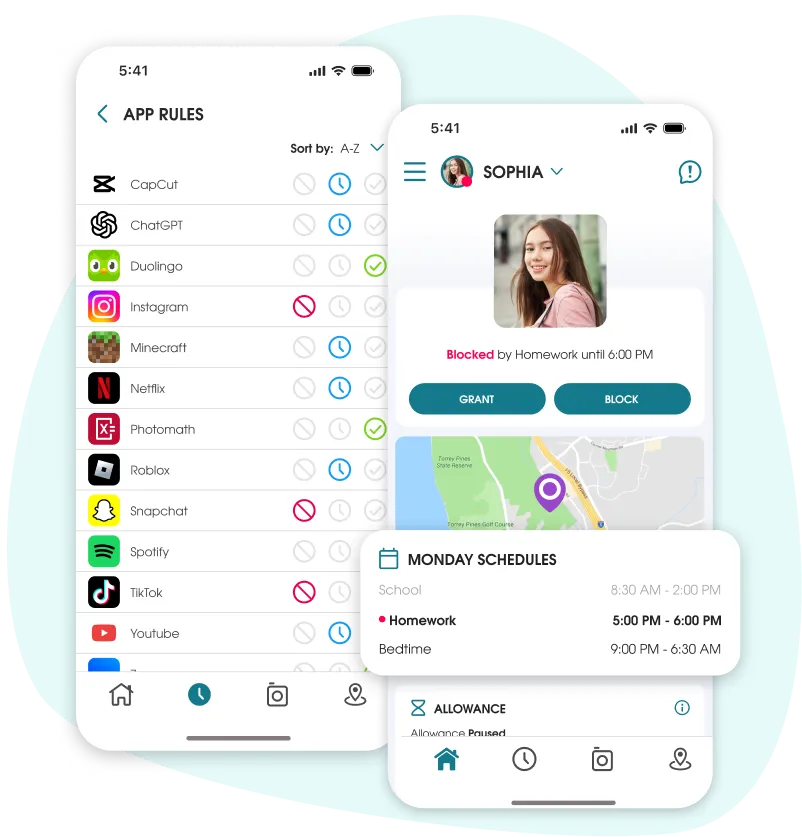
OurPact parent dashboard showing app blocking for TikTok, Instagram and Snapchat, daily schedules, and real-time child location.
Already tried Apple Screen Time?

One schedule a day, iOS devices only.
That's where most parents hit the wall.

Apple Screen Time is free and for a lot of families, that's exactly where it stops being enough. Here's the difference, side by side.

OurPact

  • Every kid's device — iPhone, iPad and Android — managed from any parent phone, no Apple Family Sharing needed
  • A schedule for every part of every day: school, homework, dinner, bedtime
  • One dashboard and web app — set a rule once, it covers all that child's devices
  • Block screen time now — or grant earned time — in a single tap
  • Screen time and family location in one dashboard — Places alerts, breadcrumb history, and a calendar of past stops
  • View shows what they're seeing and flags concerning content for your review
  • See an alert in your OurPact app the moment a new app is installed — then allow it, block it, or add it to a schedule

Apple Screen Time

  • Apple devices only. The parent needs an iPhone, with everyone in one Apple Family Sharing group
  • One downtime schedule per day
  • No web app. Manage from the phone, one device at a time
  • Buried in Settings → Family → each child. Screen Time settings are set up one device at a time
  • Location lives in a separate app (Find My). No route history or past-location calendar
  • No way to see or flag what your kids are actually viewing
  • No alert when a new app is installed

OurPact is Apple-approved — vetted and recertified by Apple every year — so you can trust it to run your kids' devices.

What ends the Screen Time negotiation

Set the rules together. The app holds the line.

It's 9:00pm. The homework's done and the phone should be too.

Schedules for every part of every day

Build a homework window, a school-day block, a no-phones-at-dinner stretch, and a bedtime cutoff — then let the schedules run on their own. The device powers down the apps, so you're not the one saying "five more minutes, then I mean it."

OurPact dashboard showing a device blocked by a Bedtime schedule from 9:00 PM to 6:00 AM with the child's location on a map.
OurPact location alert reading Sophia has arrived at Madison Park shown on a map.
"I'm at Maya's." Now you actually know.

Family location, without texting "where are you?"

See where they are in real time, set Places like school, home, or practice and get a heads-up the moment they arrive or leave, and check the day's route later. It's the peace-of-mind part of parenting — handled quietly, not by tailing them.

TikTok during homework? Not on a school night.

Block the apps that derail the evening with one tap

Allow the apps that help, block the ones that don't. Each app shows its store rating and age guidance, so you can make the call quickly and move on. And the moment a new app shows up, OurPact flags it in your dashboard so you can decide right away — allow, block, or add it to a schedule.

OurPact App Rules dashboard showing blocked social media apps including Facebook, TikTok, Instagram and Snapchat.
OurPact content category flags for parents to review concerning content.
You don't want to read every message. You just want a heads-up if something's wrong.

A check-in, not a stakeout

OurPact's optional content check flags content in four categories plus keywords you choose and organizes it for a quick look — so you can step in early when it matters and stay out of it when it doesn't. A safety net you both know is there.

Watch

See OurPact in action

Short clips on schedules, app blocking, and family location.

4.4 · 56,650 App Store ratings

What families are saying

★★★★★

"After trying 4 different apps that didn't work properly, I finally tried this and 99.9% of everything works. I can put a schedule on her phone and it removes all the apps during school and sleep."

Kaykaykaykay
★★★★★

"Easy to use, works perfectly. I can completely hide certain apps at times — perfect for school days. I can have multiple schedules and apply apps as needed. Makes my life so much easier."

Angel
★★★★★

"The only cross-platform parental control app that worked as advertised. A child who isn't trying to hide their actions won't feel like it's an invasion of privacy."

Derick F.
★★★★★

"My son has autism, so we needed a way for him to communicate with us while limiting distractions. We found OurPact 6 years ago, and now his sister uses it too. Timers and schedules limit game time before bed and during school."

Katie Y.
★★★★★

"I've used it since 2016. The developers keep adding features that make my life easier and give me peace of mind. I love the geofencing — it helps eliminate distracting apps during homework time."

SHubbard
★★★★★

"I have an Android and my son has an iPhone, and I can manage his devices pretty easily — block apps and functions individually, set times — and customer service is awesome. No complaints."

N. Hernandez
Good questions

Let us answer them

Does OurPact work on both Apple and Android?
Yes. OurPact manages iPhones, iPads, Android phones and Android tablets — and a single child profile can be paired across a mix of iOS and Android devices. You can be on either platform too.
Apple Screen Time is free — why pay for this?
Screen Time only covers iPhones and gives you one schedule a day, managed one device at a time with no web app. OurPact manages every kid's device — iPhone and Android — with a schedule for every part of every day, all from one dashboard, plus family location built in.
Does OurPact include family location sharing?
Yes. Family location is built into the same app as your screen-time rules, no second app to juggle. See where your kids are in real time, get a heads-up the moment they arrive at school or get home, and look back at the day's route or past stops when you need to.
Is my family's data safe?
Yes. OurPact uses secure encryption and strict data protection policies. We never sell or share your personal information.
Is setup complicated?
No. OurPact's guided setup pairs a device in a few minutes. Create your account, start your free trial, pair the device, and set your first schedule to get started. That's it.
Independently reviewed

OurPact in the news

CNN Underscored
The best parental control apps, tested by our editors
Read more →
Cloudwards
The best parental control app options
Read more →
Beebom
Best parental control apps for iPhone
Read more →

End the screen-time fight tonight.

Set the rules once. OurPact holds the line across every device — so dinner, homework, and bedtime stop being a negotiation.

14-Day Free Trial · Works on iPhone, iPad & Android · Apple-approved